Workspaces
Run separate businesses or clients in separate workspaces, and switch in one click.
Work management
Every client, order and project gets a clear home. Open Voro HQ and see what is done, what is late and who is on it.
No card needed. Cancel any time. Every tool in every plan.
In short
Voro HQ gives every client, team and project its own space, and every task an owner, a due date and a status. See the same tasks as a list, board, table, Gantt chart, calendar or workload view, and build dashboards from them. Custom fields, dependencies, recurring tasks and time tracking are built in.
What changes
Today
"Any update on this?" messages, all day long.
With Voro HQ
Open the board. The answer is already there, for you and for the team.
Today
Work lives in one person's head, or a spreadsheet only they understand.
With Voro HQ
Every task has an owner, a due date and a status that everyone can see.
Today
You hear about a delay when the client calls.
With Voro HQ
Overdue work shows in red on your Home, and dependencies warn you before something slips.
The real app, on demo data
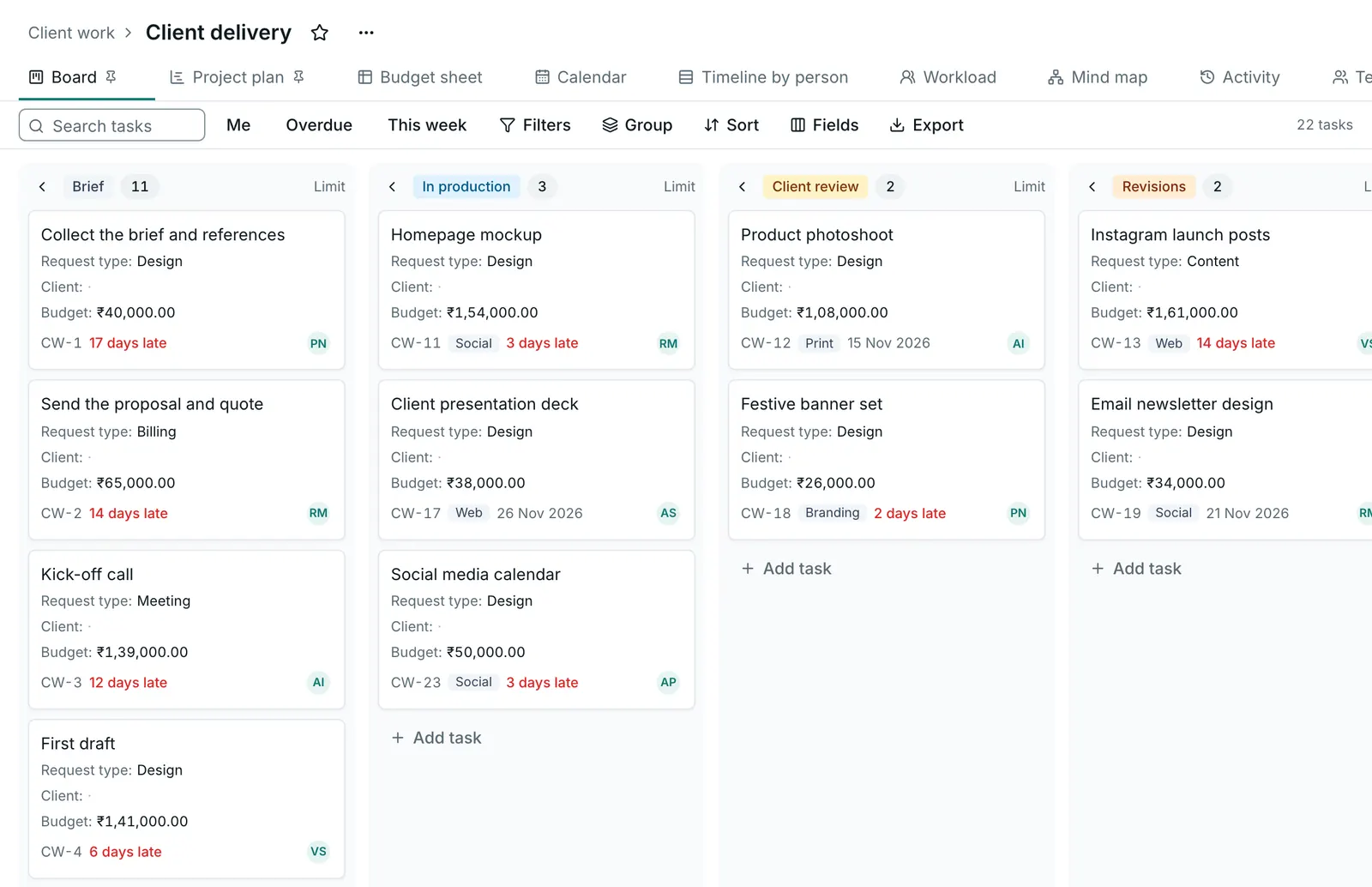
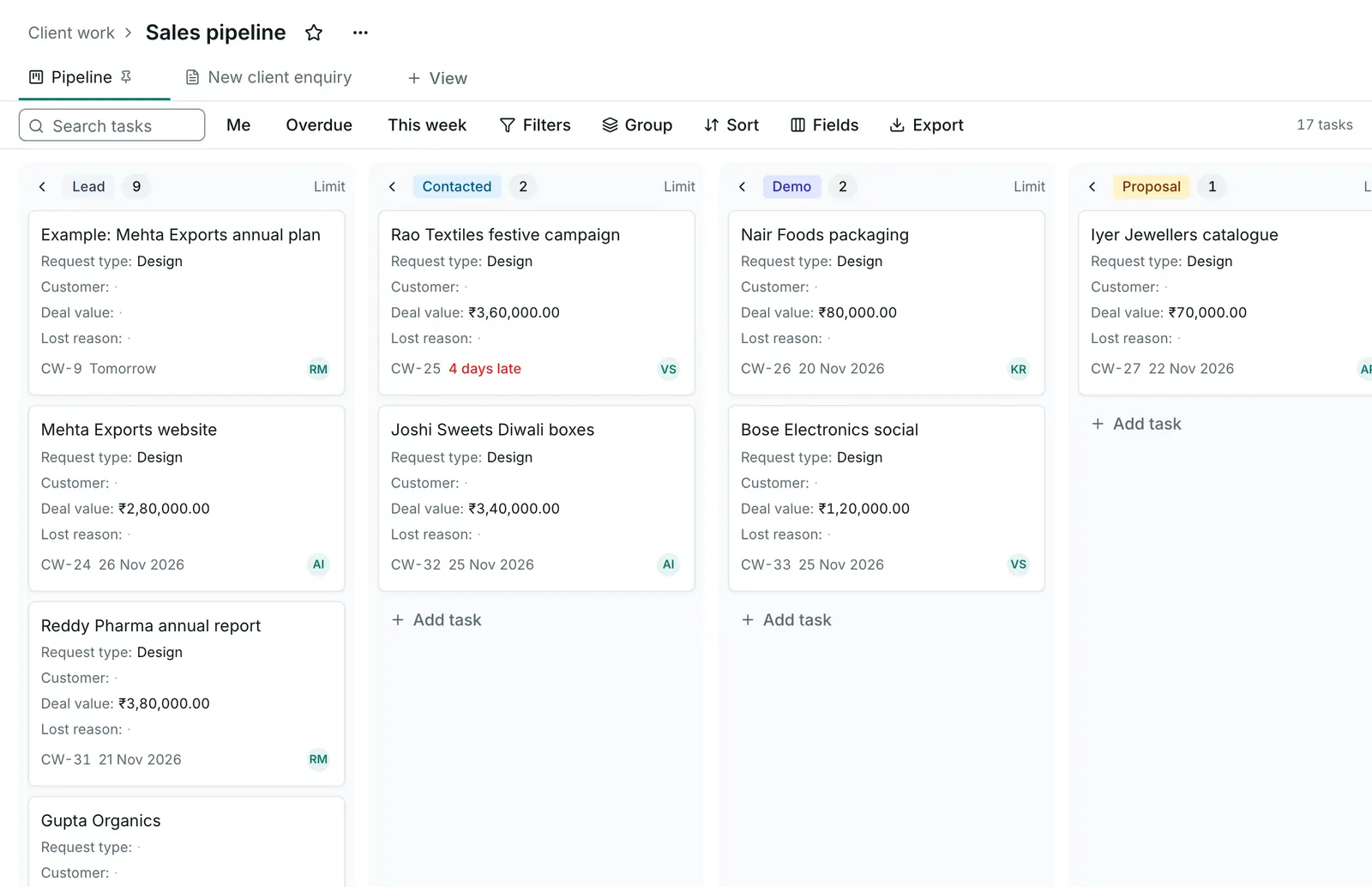
Work management
Give each client, team or project its own space. Every task has an owner, a date and a status, so nobody has to ask "what is happening with this?"
Run separate businesses or clients in separate workspaces, and switch in one click.
A clear home for every team, client or project, with colours and icons you spot at a glance.
Move spaces, folders and lists by dragging them where they belong.
Your sales team says "Proposal sent", your designers say "In review". Every space gets its own workflow.
Owners, watchers, priorities, start and due dates, rich descriptions, and subtasks up to five levels deep.
Break any task into simple tick-off steps.
Daily, weekly, monthly, yearly, after completion or your own pattern. Set it once.
Start a timer or log time by hand, mark it billable and see where the hours really go.
Mark what blocks what, and get a warning before something slips.
Show the same task in more than one list without copying it.
Readable IDs like DEV-142 that your team can quote in chat and email.
Over 35 field types, from currency, dates and people to ratings, formulas, files and signatures.
GSTIN, PAN, IFSC and UPI ID fields that check the format as you type.
Spreadsheet-style formulas like IF, SUM and DAYS_BETWEEN that update by themselves.
Link tasks to other tasks and to your contacts.
Keep clients and suppliers with your own fields, linked to any task or list.
Every task linked to a client, in one place.
Put each contact in a circle, like inner circle, client, lead or vendor, and filter by it.
Plan when to get back to someone with a note. The team sees it, and the right person gets a reminder.
Reach any contact straight from their row or page, on desktop or phone.
Bring in contacts and tasks with column matching and duplicate checks.
Moving from ClickUp? Bring your lists, statuses, assignees and custom fields.
Save any space, folder, list or task as a template, or start from 32 ready ones, from a CRM and a CA practice to a clinic, a law chamber and a wedding planner. Search the gallery and see a picture of each before you add it.
A whole space in one click, with its lists, fields, views, a dashboard and a starter doc already set up.
Archive what is finished to keep lists clean, and bring it back whenever you need it.
Removed something by mistake? Tasks, lists, spaces, docs and contacts wait in the Trash for 30 days, ready to restore in one click.
Open Voro and see what is overdue, what is due today and what is coming this week. Tick things off as you go.
Press C anywhere and type it like you would say it: "call Mehta tomorrow 4pm #client". The date and list are picked up for you.
Three quick questions, a ready-made sample space and a short tour, so a new team is working in five minutes.
C to create, / to search, J and K to move through lists, ? for every shortcut.
A bottom bar with My Day, My tasks, Create, Inbox and Search, and big tap targets.
Install Voro HQ from Chrome, Edge or Safari. It opens in its own window, with your unread Inbox count on its icon.
Light or dark, three densities, and an accent colour for each workspace.
Group fields like Client, Money and Delivery, pin the important ones onto cards and rows, and hide empty ones until you need them.
Add a field once for every task, then turn it off for the lists that do not need it.
Choose who can see or change each field. Hidden fields stay hidden in filters, exports and AI too.
Show a field only when it matters, like "Lost reason" when the stage is Lost.
Change a field's type with a preview of what happens to your data, undo it for 30 days, and archive fields instead of losing them.
See who changed a value on a task and what it was before.
Time, image and "last updated by", progress from the checklist, and invoice-style numbers like INV-0001.
Type "tomorrow 3pm" or "next Monday 10am to 12pm" and the dates are set for you, with start and due times.
Each workspace has a time zone, India by default, and each person can choose their own.
Overdue means the time has passed, not just the day, everywhere you look.
Give a task a due date and the people on it are reminded at that time.
Any number of reminders per task, before or after a date or at a set time, by app, push or email.
Reminders move when dates move, stop when the task is done, respect quiet hours, and can be snoozed.
Set "remind assignees 1 day before" once for a space or list, and reuse saved reminder sets.
Icons, colours, covers and a short description for every space and list, with progress at a glance.
A sticky header, columns you can drag and resize, totals at the bottom, and a bar to change many tasks at once.
Drop a quote, photo or signed PDF on a task so everyone works from the same copy.
Every list has its own email address. Forward an email to it and it becomes a task, files and all.
Views and dashboards
A planner wants a list, a designer wants a board, a manager wants a Gantt chart and a founder wants a dashboard. They all look at the same tasks, and a change in one view shows up everywhere.
Group by status or any field, edit inline and drag tasks between groups.
Drag cards across columns, set work-in-progress limits and swimlanes.
A real spreadsheet: arrow keys, copy and paste with Excel and Google Sheets, fill down, frozen columns and totals.
Drag tasks from an unscheduled tray onto your week and resize them.
Drag bars, draw dependencies, see the critical path and compare against your original plan.
Work on a time axis, grouped by person, client or any field.
Spot who is overloaded and rebalance by dragging tasks between people.
Brainstorm with Tab and Enter, and every idea becomes a real task.
Plot tasks and clients with an address on a map.
Forms that create tasks by themselves. Good for client requests, leads and job applications.
What changed today, and who is working on what right now.
Every task in the workspace, or just yours, in one view.
Each view remembers its filters and columns. Keep it personal or share it.
Filter on any field with AND and OR groups and one-click quick filters.
Download any view as CSV, Excel or PDF, with Hindi names and the rupee symbol printed correctly.
Drag, drop and resize widgets to build the dashboard you need, on desktop or phone.
Charts, burndown, workload, time tracked, overdue lists, sums of any number field, notes and leaderboards.
Click any part of a chart to see the exact tasks behind it.
Put your dashboard on the office screen, full screen.
Ten ready-made dashboards, from founder overview and sales activity to CRM, content, finance, IT, study and coaching.
Show goal progress and habit streaks on any dashboard.
Filter each widget, give it its own dates or custom dates, and pick a style: bar or horizontal, donut or pie, line or area.
Give each widget a colour and a target, shown as a progress bar or a dashed goal line.
Rename a dashboard in place, keep it personal or share it, duplicate it and add a cover. Duplicate a widget, or remove it with Undo.
Pin up to four dashboard charts to My Day, so the numbers you watch are there each morning.
AI festival posts
Add your logo once. Pick a festival and AI designs two original posts with your name and number on them, in about a minute, ready for WhatsApp and Instagram. Included in every plan.
Real posts, made with Voro HQ



1Set up your brand kit
Add your logo and details, tap anything you want to keep off your posts, and pick your colour from your logo.

2Make posts in one tap
Pick a festival, choose your kit, and two designs are ready in about a minute.
AI designs one calm, minimal post and one bold, creative post for each festival. Pick your favourite.
Your logo, name, phone, email, website and address, exactly as you type them. Switch off anything you want to keep private.
See a live preview as you fill it in, and pick your colour straight from your logo.
Your sales team can post in their own name and number, beside the company kit.
Diwali, Eid, Christmas, Good Friday or Friendship Day, each with its own colours and symbols, made with respect.
Tall portrait images, ready to download and post on WhatsApp Status, Instagram and Facebook.
Every plan includes festival images for each person each month, shared by your team. Add an image pack whenever you need more.
A new teammate can add a task in their first minute: press C and type it the way you would say it. A sample space and a short tour show the rest.
Import tasks and contacts from a CSV file. From ClickUp, bring your lists, statuses, assignees and custom fields across.
Start with one list. Add boards, custom fields and dashboards when you need them. Nothing makes you use everything.
Your whole business. One app.
Set up your team this afternoon. Every tool, for one simple price.
Try it free for 14 days. No card needed.
Start free trialVee
Voro HQ's helper. Here day and night.